Maximizer
Overview
Ozone’s acclaimed IRC (Intelligent Release Control) technology lets you boost the overall level of your mixes without sacrificing dynamics and clarity. Upward Compress and Soft Clip are also available as methods to increase the loudness and level of your masters. The Maximizer applies to the entire bandwidth of the mix; it is not a multiband effect.
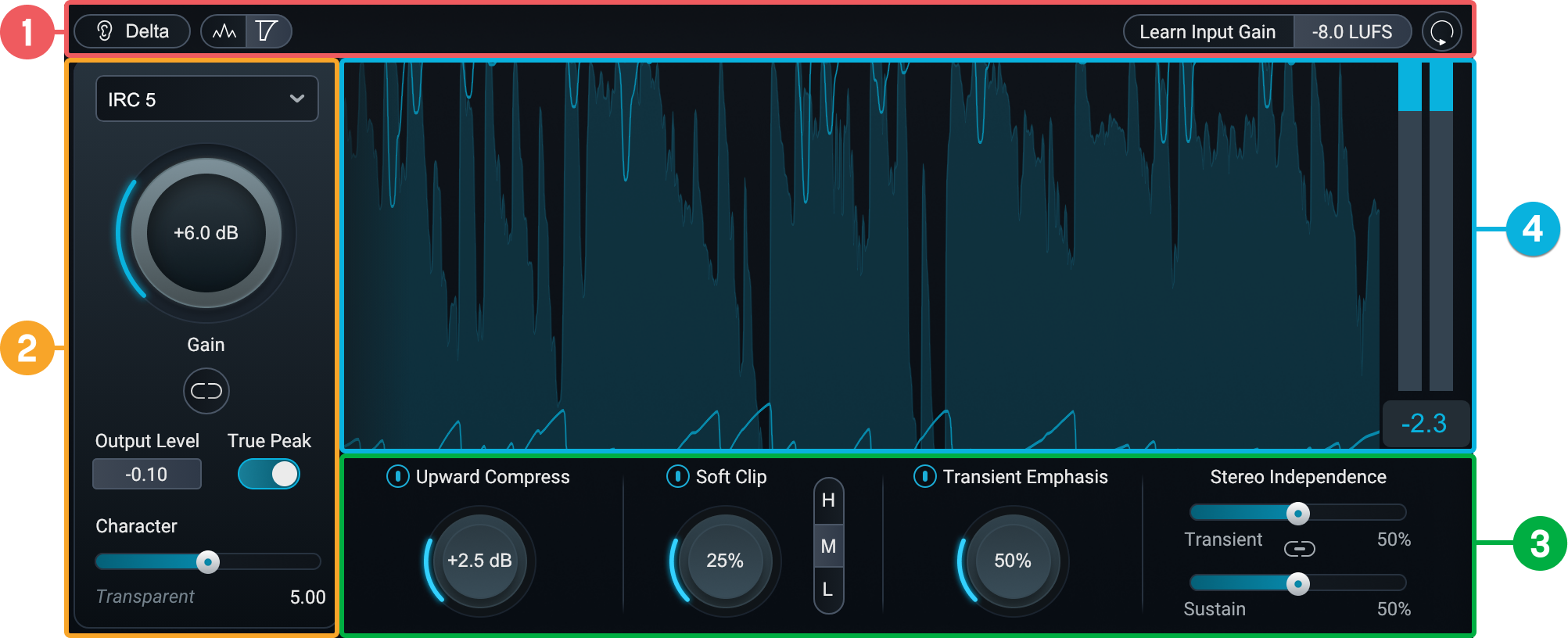
The module interface includes the following main sections:
 |
Module Header
The module header area includes the following controls:
 |
Delta: Monitors the change created by Maximizer. This includes the peaks attenuated by the limiter and the boost applied by Upward Compress and Soft Clip. This does not monitor gain changes from the Gain or Output Level controls.
View Selector: See the Views section below for detailed descriptions of the different meter views.
Learn Input Gain: When enabled, the Maximizer will listen to your track for five seconds and set the Gain such that the output loudness matches the Target LUFS value. Learn Input Gain will automatically turn off when learning is complete.
Warning
Learn Input Gain should not be used to meet loudness compliance standards.
Target LUFS: Sets the loudness target (in LUFS) that the Maximizer will use when calculating the optimal Gain for your track.
Reset: Returns all module controls to their default values.
Main Controls
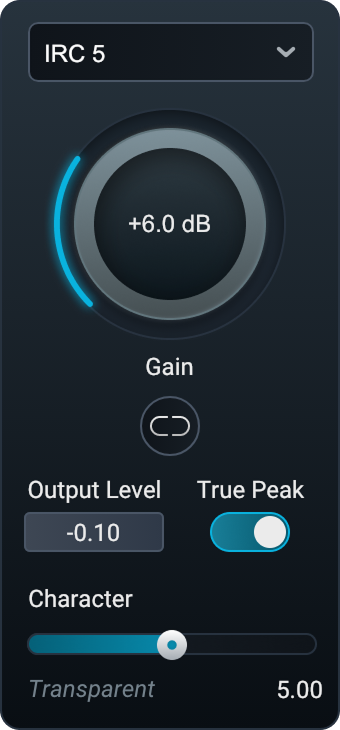
The Maximizer includes the following main controls:
 |
Mode
The Maximizer includes the following Intelligent Release Control (IRC) modes:
IRC Low Latency: Provides the intelligent digital loudness maximization of IRC 1 with lower latency. IRC Low Latency is the lowest latency and least CPU intensive IRC mode.
IRC 1: Provides intelligent digital loudness maximization of the signal. It does this by analyzing the source material and applying limiting in a psychoacoustically pleasing manner, reacting quickly to transients (to prevent pumping) and reacting more slowly to steady bass tones (to prevent distortion).
IRC 2: Similar to IRC 1, but optimized to preserve transients even more, so they sound sharper and clearer in the output signal, even when aggressive limiting is taking place.
IRC 3: Allows for the most aggressive limiting by using an advanced psychoacoustic model to intelligently determine the speed of limiting that can be applied to the incoming signal, before producing distortion that is detectable to the human ear. Very CPU-intensive, and produces high latency, especially at higher sampling rates. You may find that at sampling rates greater than 48kHz you are unable to use IRC 3 mode in real-time.
IRC 3 Character Styles: The following character styles will help you manage the limiter’s sound by constraining its release behavior:
Clipping: The most aggressive style setting of IRC 3 and will slightly colorize your mix with distortion or achieve the highest degree of loudness with the greatest risk of clipping.
Crisp: Agressively constrains the limiter’s release behavior and will favor distortion over any pumping.
Balanced: Constrains the release behavior of the limiter in a generally transparent way and should be suitable for most material.
Pumping: The least aggressive style setting for IRC 3 and does not constrain the limiter’s release behavior. It can tend toward a slower release behavior and may result in pumping. This is the “legacy” setting and is the behavior used in Ozone version 5.01 and earlier.
IRC 4: This mode builds upon our existing IRC technology by shaping the spectrum to further reduce pumping and distortion. As the signal goes farther over 0 dBFS, the IRC 4 algorithm limits frequency bands that contribute most to these peaks. This reduces intermodulation between different signal components and uses dozens of psychoacoustically spaced bands in order to react to any type of audio. When no limiting is necessary, the spectrum will be unaltered. Very CPU-intensive, and produces high latency, especially at higher sampling rates**.
IRC 4 Character Styles: The following character styles will help you manage the limiter’s sound by constraining its release behavior:
Classic: Provides general enhancement of the overall mix with a sound more reminiscent of Ozone’s earlier limiting algorithms which are still being used by professionals today.
Modern: Provides general enhancement and life to your mix but with greater detail and clarity than the Classic style.
Transient: Optimized for maximum preservation of all transients resulting in a highly detailed overall sound that may benefit some mixes needing added clarity.
IRC 5: Provides the first multiband limiter design in Ozone. Unlike previous single-band IRC modes, IRC 5 splits the signal into four frequency bands, each with its own optimized attack and release times. This reduces pumping and intermodulation distortion caused by heavy low-frequency content affecting higher frequencies. The result is a louder, cleaner master with improved transparency. Because IRC 5 prioritizes frequency bands that contribute most to peak levels, it can create a subtle tonal shift. However, this has been carefully balanced by iZotope’s Sound Design team to ensure maximum clarity and loudness while preserving character. When no limiting is necessary, the spectrum is unaltered. IRC 5 utilizes the technology from IRC 3, allowing for the most aggressive limiting by using an advanced psychoacoustic model to intelligently determine the speed of limiting that can be applied to the incoming signal, before producing distortion that is detectable to the human ear. This mode is the most CPU-intensive and requires the most latency of all the IRC modes.
Gain
Adjust the Gain of the Maximizer to push the signal into 0 dBFS, where limiting will begin to take place.
Tip
Previous versions of Ozone Maximizer presented this parameter as Threshold. The new Gain control effectively works the same as the Threshold control, except that now you turn Gain up instead of turning Threshold down.
Gain and Output Level Link
Enable to link the Gain and Output Level controls. Adjusting either control in linked mode will adjust the other control by the inverse amount. This can be useful for hearing the changes from the limiter without the “louder is better” bias.
Output Level
Adjust to set the maximum output level of the Maximizer.
Tip
Previous versions of Ozone Maximizer presented this parameter as Ceiling. The new Output level control is doing the same thing, it has just been re-named to be more intuitive.
True Peak
When enabled, the limiter will account for the levels of each digital sample and the levels of the analog signal that will eventually be produced by D/A conversion. This is sometimes necessary, since an analog signal’s peak level can exceed the corresponding digital signal’s peak level by more than 3 dB.
Warning
This option will result in a small increase in CPU usage, but if your mixes are running very hot you may want to enable it to ensure that absolutely no distortion is introduced when your audio is finally run through a D/A converter.
Character
Adjust to customize the overall response time (attack and release times) of the maximizer processing. The attack and release times used are dependent on the selected Mode, and allows a continuous range from Clipping (0.0) to Very Slow (10.0) in each mode. There is also a description of each character range.
Secondary Controls
The Maximizer includes the following secondary controls:
 |
Upward Compress
Upward compression is a highly transparent form of compression. Rather than reducing the gain of peaks, it boosts the gain of quiet sections. Our Upward Compress processing is parallel compression, but with a very intentional design that gives it particularly useful properties:
The main control is in decibels. This is the maximum amount of gain that will be applied to quiet sections.
The processing is level-matched across its range so that peaks at 0 dBFS will remain at roughly the same level at any Upward Compress setting.
Upward Compress is applied before the IRC Maximizer.
Soft Clip
Enable Soft Clip processing before the IRC Maximizer by clicking the Soft Clip power button. Adjusting the Amount control provides a high fidelity loudness boost by controlling the wet/dry of the Soft Clip processing. At 100% the signal will fully clip at 0 dBFS.
Note
The Soft Clip processing is oversampled 4x to prevent aliasing distortion.
Soft Clip has three modes that provide a variety of loudness boosts and saturate the edges of the signal differently:
Light: begins saturating the signal at -3 dBFS.
Moderate: begins saturating the signal at -9 dBFS.
Heavy: begins saturating the signal at -30 dBFS.
Transient Emphasis
Enable Transient Emphasis adjustment by clicking the Transient Emphasis power button. Adjusting the Amount control allows you to fine-tune the shaping of transients before limiting takes place. This can be useful for preserving sharper sounds, like drums, while still optimizing loudness.
Tip
Using higher amount values for Transient Emphasis will result in more pronounced transients after the limiting process.
Stereo Independence
The Stereo Independence controls represent the next iteration of the Stereo Unlink control in previous versions of Ozone. By default, the Stereo Independence controls (Transient and Sustain) will be linked and set to 0% - mimicking the default settings of the previous Stereo Unlink control.
Transient Slider: Adjusts how the limiter responds to transient material across channels.
Sustain Slider: Adjusts how the limiter responds to sustained material across channels.
Link: Links the Transient and Sustain sliders.
Note
Both Sliders set to 100%: It is possible to achieve a louder output from the Maximizer, but this can result in a narrow stereo image. To alleviate the narrowing effect of the Stereo Unlink control, we split this feature into two sliders.
Sliders independently set to non-zero values: Applies limiting to transient and sustained material separately, based on a level envelope generated from a ratio of the individual channel levels and the entire stereo image.
Views
You can toggle between the different views using the view selector buttons in the module header area.

The Maximizer module includes the following views:
Spectrum Analyzer
Gain Trace
Gain Reduction Meter
Spectrum Analyzer
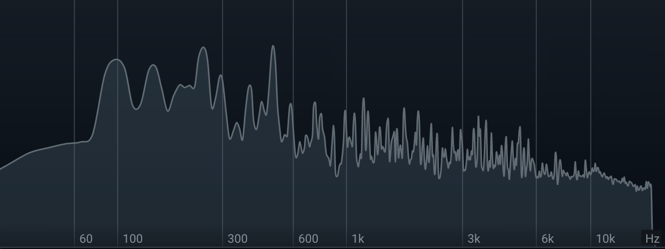
Displays the magnitude (amplitude, in decibels) of a signal across the frequency spectrum in real-time. The spectrum analyzer displays the output signal of Ozone.
 |
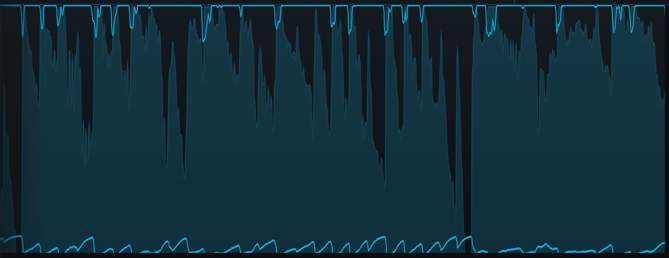
Gain Trace
Displays a scrolling waveform with a superimposed trace reflecting the amount of gain applied over time.
The trace the comes down from the top shows the attenuation from the limiter.
The trace that comes up from the bottom shows the boost from Upward Compress.
 |
Gain Reduction Meter
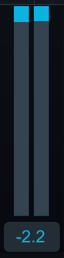
Displays the gain reduction applied by the limiter in the left and right channels.
The text readout at the bottom of the meter displays the current gain reduction amount that is being applied by the limiter.