Bass Control
The Bass Control module provides a set of tools to shape and enhance the low end of your master. Balance and Punch help you optimize the level and impact of bass in relation to the rest of your mix, while Sustain Power and Peak Control give you finer control over the tone and dynamics of low frequencies. The module also includes an Oscilloscope and Sweet Spot meters, which provide visual feedback of bass balance, punch, and dynamics. These displays can be especially helpful in situations where your monitoring environment doesn’t accurately reproduce low frequencies, allowing you to spot issues such as weak sub-bass, clashing kick and bass, or over-compressed low end. Together, these controls and meters make it easier to achieve a bass response that is powerful, controlled, and consistent across different playback systems.
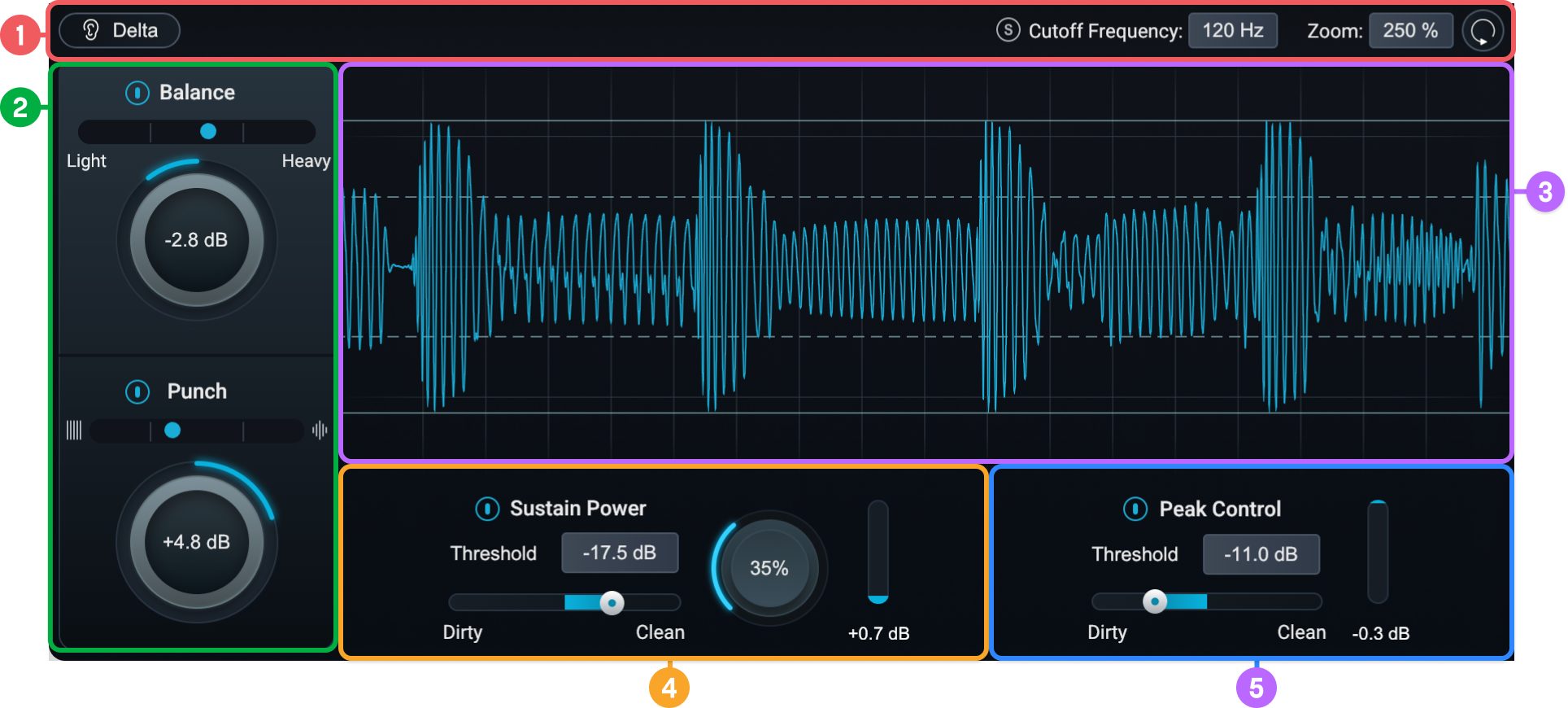
The Bass Control interface includes the following sections:
 |
Module Header
The module header includes the following controls:
 |
Delta: Monitors the difference in the signal before and after the Bass Control module.
Bass Solo: Monitors the bass frequencies below the Cutoff Frequency.
Cutoff Frequency: Adjusts the frequency range that Bass Control is affecting. Only frequencies below this cutoff will be affected.
Zoom: Adjusts the visible range of the Oscilloscope, enabling you to visualize signals with less gain and set threshold with extra resolution.
Reset: Returns all module controls to their default values.
Balance and Punch
The Balance and Punch panel contains the following controls and meters:
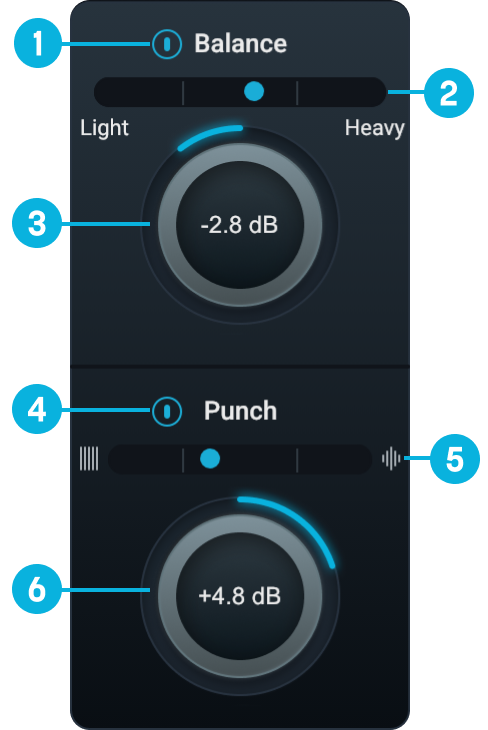 |
Balance Enable/disable: Click the power button to turn Balance processing on or off.
Balance Sweet Spot meter: Provides visual feedback of the bass-to-high-frequency balance in your mix. This view is similar to the Broad view of Tonal Balance Control. Aim to keep the floating ball within the target region during loud, full-frequency passages.
If the ball drifts left, your master may be lacking bass.
If the ball drifts right, your master may contain too much bass.
Balance: Adjusts the level of frequencies below the Cutoff Frequency. This applies gain directly to the low end of your mix.
Punch Enable/disable: Click the power button to turn Punch processing on or off.
Punch Sweet Spot meter: Provides visual feedback of the low-end crest factor. This view is similar to the crest factor meter in the upper-left area of Tonal Balance Control. Aim to keep the floating ball within the target region during loud, full-frequency passages.
If the ball drifts left, the low end may sound overly compressed or lack transient impact.
If the ball drifts right, the low end may be too dynamic and lack sustained power.
Punch: Adjusts the perceived punch of the kick drum by isolating and applying gain to the low frequencies of the drum signal. This allows you to shape kick drum impact without altering the envelope in the way compression or expansion would.
Oscilloscope
The Oscilloscope meter contains the following elements:
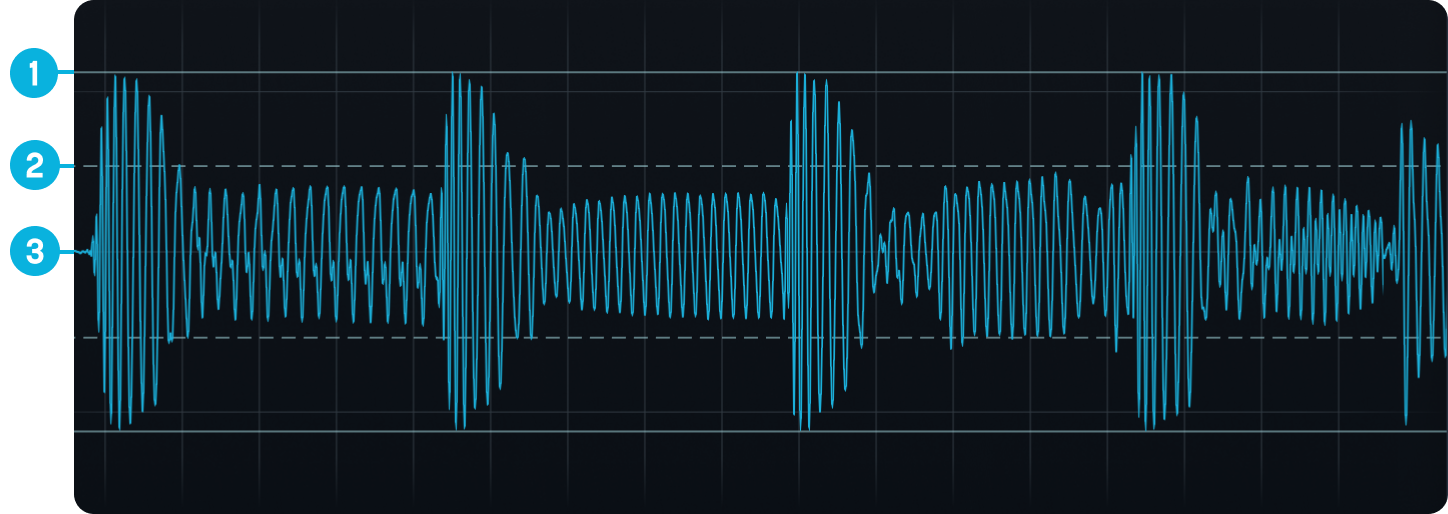 |
Peak Control Threshold: The solid white line represents the Peak Control Threshold. This functions as a limiter, ensuring that bass levels do not exceed the threshold.
Sustain Power Threshold: The dashed white line represents the Sustain Power Threshold. Increasing the Sustain Power Amount amplifies audio that falls between the dashed lines, creating a fuller and more powerful sustained bass tone. Transients are unaffected and pass through this threshold. For best results, place the Sustain Power Threshold between the peaks of your kick drum and just above the sustained bass level (see image above).
Bass waveform: Displays the waveform of bass frequencies below the Cutoff Frequency. This view can provide insight into the low end of your master, even when monitoring conditions are less than ideal. Use it to spot issues such as kick and bass conflicts, or weak and inconsistent low-frequency hits. The visible area of the Bass Waveform can be adjusted using the Zoom control in the Module Header.
Sustain Power
Sustain Power is a form of upward compression designed to make bass sound more full, powerful and consistent.
The Sustain Power metering and controls have the following elements:
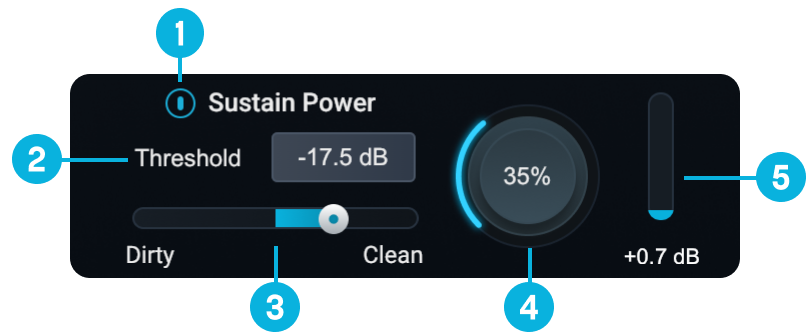 |
Enable/disable: Click the power button to turn Sustain Power processing on or off.
Threshold: Sets the level below which upward compression is applied. This is shown as a dashed line in the Oscilloscope. For best results, set the Threshold between the peak levels of your kick drum and the sustained bass.
Character: Blends between two different types of upward compression:
Dirty (left): Applies waveshaping to generate harmonic content. This can make the low end more audible on smaller speakers but may introduce audible distortion if pushed too far.
Clean (right): Applies transparent upward compression with no added harmonics. Useful when you want a strong low end without coloration.
Amount: Controls the overall intensity of Sustain Power. Increasing this control boosts bass frequencies below the Threshold, filling out sustained low end between the dashed lines in the Oscilloscope.
Gain Readout: Provides visual feedback of the processing applied by Sustain Power, showing the amount of gain boost in decibels.
Peak Control
Peak Control is a limiter designed to keep low-end transients controlled. This can improve the performance of downstream compression and limiting by reducing pumping and distortion.
The Peak Control section has the following elements:
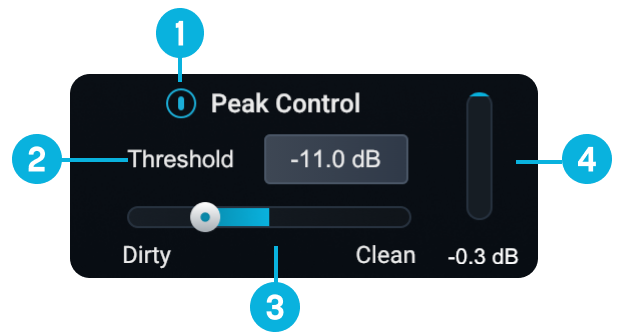 |
Enable/disable: Click the power button to turn Peak Control processing on or off.
Threshold: Sets the level where limiting begins. This is displayed as a solid line in the Oscilloscope. For best results, set the Threshold at the peak level of your kick drum so that the limiter only reduces the loudest hits.
Character: Blends between two limiting styles:
Dirty (left): Uses clipping to control peaks, generating harmonic content that makes kicks more audible on smaller speakers. May introduce distortion if pushed too far.
Clean (right): Applies transparent limiting with minimal harmonic coloration. Useful when you want precise control of transients without added tone.
Gain Readout: Provides visual feedback of the limiting applied, showing the amount of gain reduction in decibels.