Low End Focus
Overview
Low End Focus is designed to intelligently reduce muddiness, increase low end impact, and address other common low end issues that may not be easily improved with traditional tools such as EQ or Dynamics.
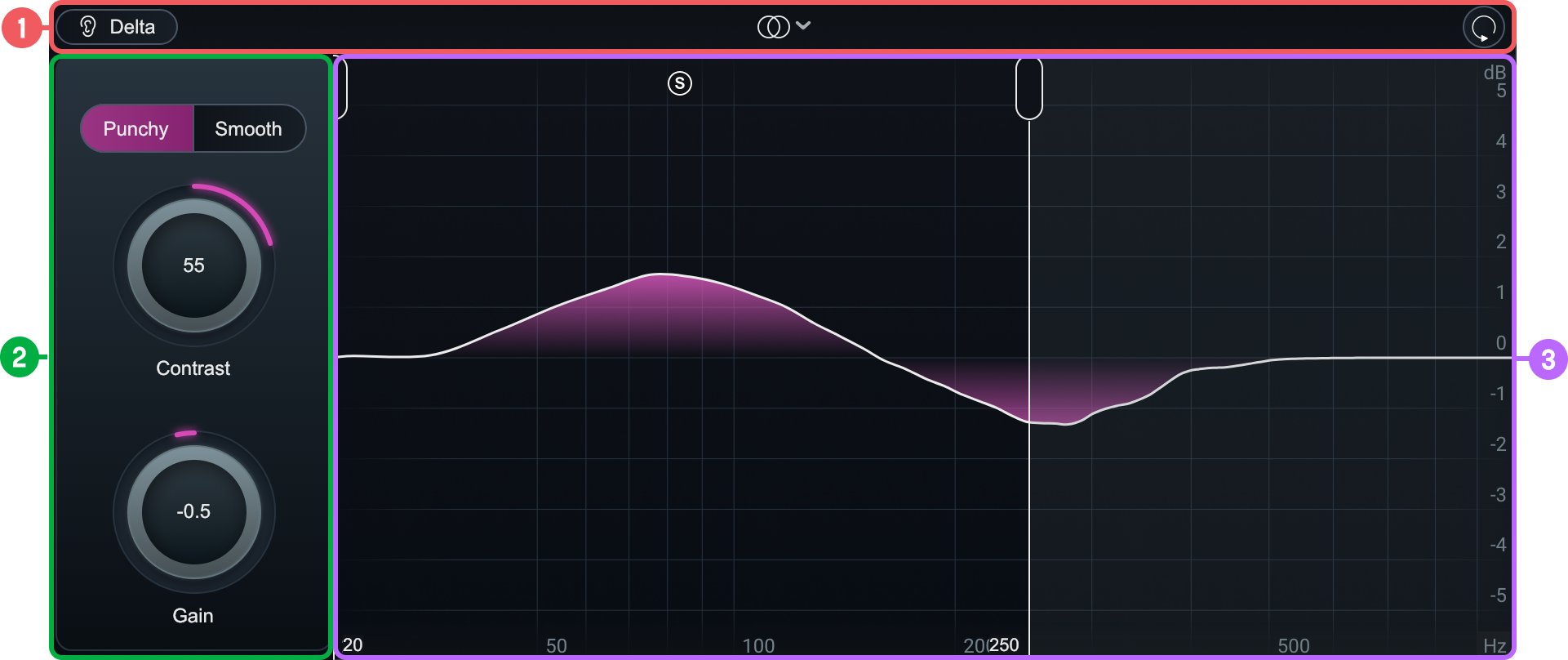
The module interface is comprised of three main sections:
 |
Module Header
The module header includes the following controls:
 |
Delta: Monitors the difference in the signal before and after the Low End Focus module.
Channel Processing Mode: Selects the Channel Processing Mode used in the Low End Focus module.
The Low End Focus module supports Stereo, Mid/Side, or Transient/Sustain mode.
See the General Controls chapter for more information.
Reset: Returns all module controls to their default values.
Controls
Low End Focus includes the following controls:
Modes
Determines the response time of Low End Focus processing. These modes influence how processing is applied to sustained and transient content within the action region. You can choose between the following modes:
Punchy: Uses faster response times to emphasize transient content.
Smooth: Uses slower response times to enhance sustained content.
Contrast
Adjusts the spectral contrast between low and high level signals within the action region.
Positive values: Increases the difference between low and high level content. Attenuates ‘out-of-focus’ low level content, bringing out transients and leading to a punchier sound.
Negative values: Decreases the difference between low and high level content. Blurs the low end in a similar way to saturation. Transients will lose focus similar to the smoothing effect of some analog compression.
Gain
Sets the amount of makeup gain applied to the action region.
Difference Meter and Action Region
Displays the tonal changes that the Low End Focus processing is applying. This is similar to an EQ where frequency is measured from left to right and gain is up and down. Different from an EQ, Low End Focus will adapt its spectral contour over time.
This area also includes the action region cutoff handles that will focus the processing to a particular frequency range. Low End Focus allows for an action region range of 20 Hz to 300 Hz.
Action Region Cutoff Adjustments: Drag a handle to adjust a single cutoff value, click between the two handles to move them together, or single-click on the value readout and manually enter a cutoff value.
Solo: Isolates playback of the input signal (before processing) within the action region cutoffs.