Stabilizer
Table of Contents
Overview
Stabilizer is an adaptive mastering equalizer that reacts to the incoming audio and applies frequency corrections to tonally balance a signal or tame resonances.
The Stabilizer interface includes the following sections:
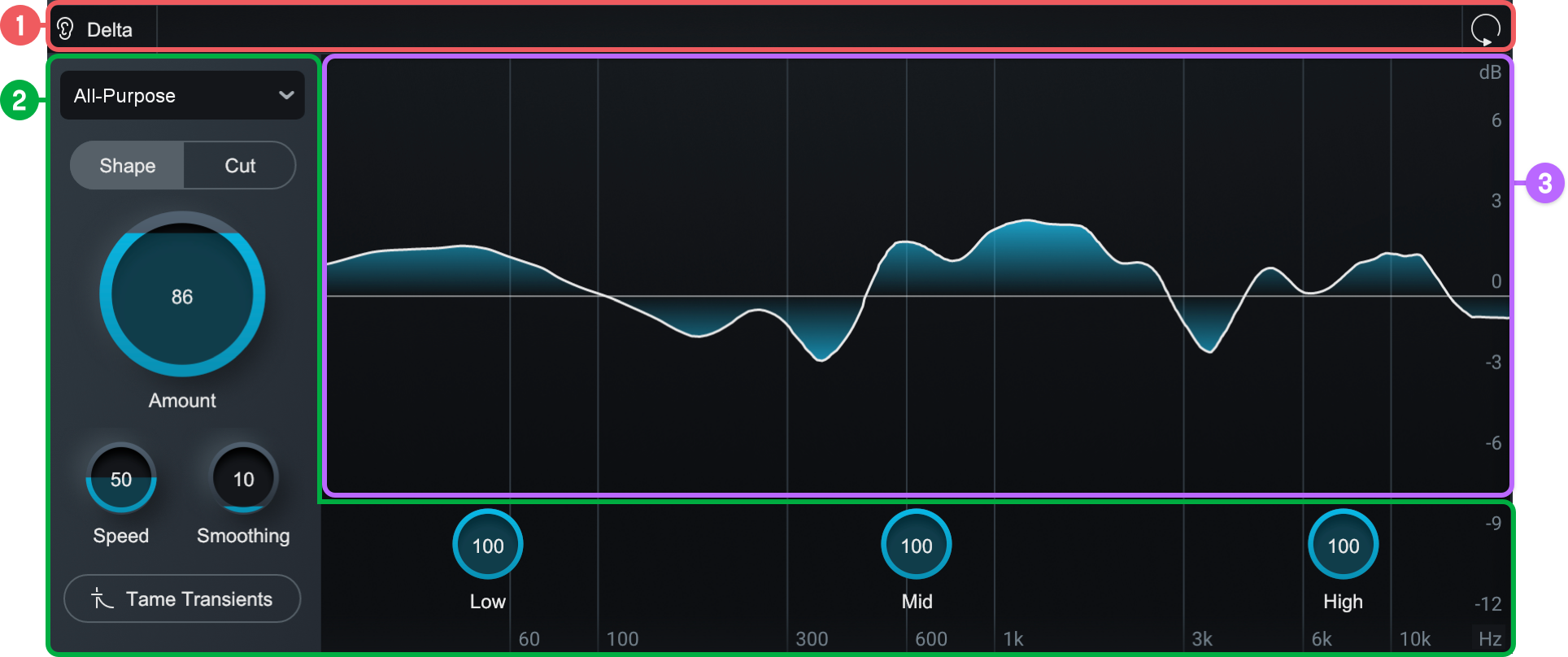
Module Header
The module header includes the following controls:

- Delta: Monitors the difference in the signal before and after the Stabilizer module. This can be particularly useful to hear what is being removed in Cut mode.
- Reset: Returns all module controls to their default values.
Controls
The Stabilizer module includes the following controls:
Target
Selects the target tonal balance for Stabilizer processing. These target profiles are visible in the Master Assistant Overview. The “All-purpose” tonal balance target is based on the “Bass Heavy” target curve in Tonal Balance Control.
When a reference file target is selected in Master Assistant, an “Assistant” target will be available in Stabilizer. To recall this target later with other instances of Stabilizer, you can save it as a module preset.
Mode
Determines the type of EQ adjustments Stabilizer will make to match the selected Target. You can choose between two modes:
- Shape: Stabilizer applies EQ boosts and cuts as it corrects your audio to the Target tonal balance. The processing will attempt to remain loudness neutral by applying an equal amount of boost and cut.
- Cut: Stabilizer only applies EQ cuts as it tames resonant frequencies that exceed the upper bounds of the Target tonal balance.
Amount
Scales the gain of the Stabilizer’s adaptive tonal corrections. At 100, the maximum gain that Stabilizer can possibly boost is 9 dB.
Speed
Controls how quickly the Stabilizer tonal corrections will react to the incoming audio signal. Higher speeds can provide a more precisely-timed correction but may introduce artifacts.
Smoothing
Controls the contour of the tonal corrections applied by Stabilizer in Shape Mode. At 100 smoothing, the EQ correction will look like 3 - 4 filters. At 0 smoothing, the EQ correction will look like many filters working across the frequency spectrum. Lower Smoothing values will provide a more precise frequency correction but may introduce artifacts.
Sensitivity
Controls how often the Stabilizer will detect resonances. At 0 Sensitivity, Stabilizer will permit all but the most excessive resonances without attempting to correct them. At 100 Sensitivity, Stabilizer will suppress any tonal deviation from the selected Target.
Tame Transients
Enables Stabilizer to react instantly to tonally correct any transient material.
Low Mid High Amounts
To control how much processing Stabilizer applies across the spectrum, you can scale the amount of tonal correction in three frequency areas:
- Low: Below 100 Hz. The processing will attempt to remain loudness neutral by applying an equal amount of boost and cut.
- Mid: Between 100 Hz and 5.6 kHz.
- High: Above 5.6 kHz.
Difference Meter
Displays the tonal changes that the Stabilizer processing is applying. This is similar to an EQ where frequency is measured from left to right and gain is up and down. Different from an EQ, Stabilizer will adapt its tonal corrections over time.